Current page
A Comprehensive Guide to Preparing for and Managing Online Events from Start to Finish
Research

Essential Online Event Management Skills During the COVID-19 Pandemic
Due to the outbreak of the novel coronavirus, restrictions on movement across prefectures have been intermittently imposed. As a result, the economic situation has deteriorated nationwide, leading to the adoption of remote work across various industries.
Among the industries significantly impacted by the pandemic are event sectors such as concerts, live performances, and theater. Unable to bring fans from all over the country to venues, the income has drastically decreased.
Various reforms have been implemented to improve this poor performance. One of the breakthroughs has been paid online events and live streaming that can be participated in from smartphones and computers. However, if strategies such as preparation and promotion are not carefully considered, satisfactory results will not be achieved. This time, we will introduce the flow of planning and holding online events, as well as points to note.
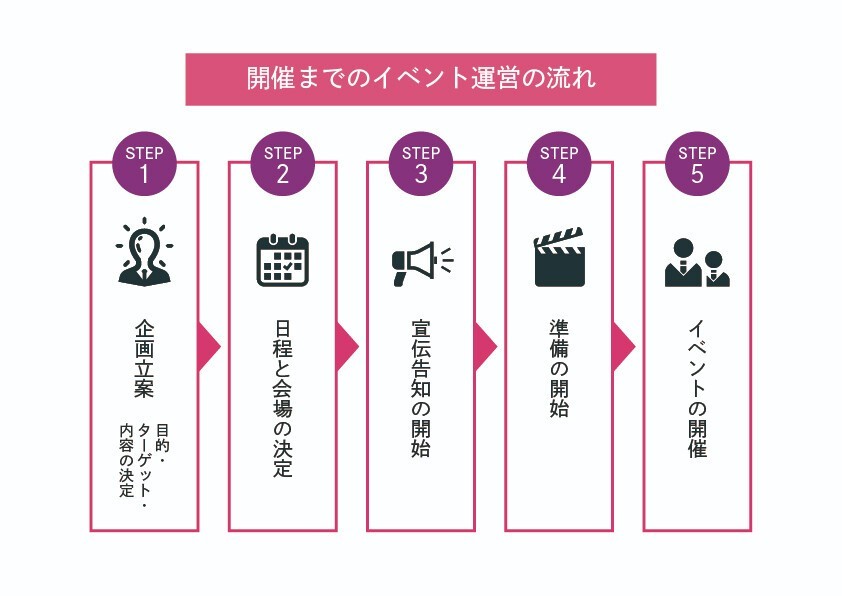
Let’s Think About Planning Online Events
First, the basic undertaking for holding an online event is “planning.” If the plan is not well thought out, the event may not proceed smoothly. Rather than hastily creating a plan, it is key to firmly grasp the purpose and target audience. Using a framework such as the 5W1H (who, what, where, when, why, and how) will help organize the information effectively.
Now, let’s take a closer look at the specifics.
1.Consider the Purpose of the Event
When planning, let's consider the purpose of the event as a basic premise. For example, even for an online company event, the purpose must be clearly defined.
Whether the aim is to deepen interactions or promote the company, the content of the plan should differ according to the purpose.
Ignoring these fundamental elements can obscure the event’s direction. To create a great plan, having a clear purpose is of utmost importance.
Also, after defining the purpose, it is advisable to set a “criteria for achieving the purpose.”
For instance, if the goal is interaction, the state where participants exchange social media accounts or where everyone has spoken to each other at least once would be ideal. These can be assessed through surveys conducted after the event.
Clearly defining the criteria for achieving the purpose will also contribute to how the event is structured, teamwork, and staff motivation.
2. Narrowing Down the Target

Photo by Melanie Deziel on Unsplash
At the planning stage, a certain level of target audience must also be narrowed down. Everything requires services to be developed based on customer needs.
A common mistake is attempting to cover “all demographics (age, gender, etc.).” If you do not firmly decide on the target, it will be difficult to satisfy event participants.
The target audience varies by the event’s purpose
The target audience differs based on the event’s purpose. For example, for a classical music concert, most attendees are likely to be those who want to enjoy music calmly. While younger people attend as well, senior citizens are also likely to want to participate actively.
On the other hand, if it’s a concert featuring popular musicians, it is likely that there will be many young adults in their 20s and 30s. Additionally, the demographic most focused on business-related online seminars tends to be working professionals, such as office workers and business owners, with less interest from housewives and seniors.
Thus, based on the content and purpose of the event, one must think about the target audience to be acquired.
Notification methods vary by target
When inviting customers to the event, the notification methods will also differ significantly based on the target audience.
If the event targets younger audiences, methods using social media can be effective. By posting event promotions and having friends and acquaintances share them, it will lead to wider dissemination.
There are also ways to attract attendees using web advertisements.
For BtoC events, Twitter ads or Instagram ads are suitable, while for BtoB events, listing ads or Facebook ads work well.
However, using web advertising requires the support of someone with specialized knowledge.
When inviting seniors, one can use online services aimed at seniors. Examples include services like “Rakuraku Community” or “Hobbyist Club.”
For specific methods of notification, please refer to the section “Let’s Start Announcing Online Events” in the document.
3. Develop Concrete Planning Ideas
After preparing so far, you will brainstorm specific ideas based on discussions. This element is crucial when determining the event's direction.
When developing planning ideas, it is essential to focus on creativity. If your management approach is similar to other events, participants may lack interest.
As online events have only been integrated widely throughout Japan for a short period, there is still room to create new methodologies with flexible ideas.
Let's Decide on the Date and System for the Online Event

Photo by Towfiqu barbhuiya on Unsplash
Once the direction for the online event is established, decide on the date and streaming system. Set a comfortable schedule and take care to avoid troubles.
If you are hosting an online event for the first time, organizing the streaming system will likely take time. To allow for sufficient preparation time, it’s essential to decide on the schedule as early as possible.
Deciding on a Date
The key point to keep in mind when determining the event date is the lifestyle of the participants. Although it’s an online event, attending still consumes time. Therefore, it’s important to carefully consider the date for the participants' sake.
For example, for a concert focused on entertainment, Saturday or Sunday during a long weekend might be ideal. If the target demographic is housewives with children, weekdays during school hours may be preferable.
Thus, imagining the target audience’s lifestyle and carefully considering the date and time settings is crucial.
Deciding on the Event Streaming System
After specifying the date, decide on the system for streaming the event.
Currently, many online streaming apps like “ZOOM,” “YouTube Live,” and “Instagram Live” are available.
However, these services may not allow paid streaming.
If you plan to hold an event with paid streaming, Zaiko's live streaming is recommended.
Zaiko's live streaming allows for tipping (STICKITS) during the live broadcast, and you can also pay extra to support it on top of the ticket price.
Zaiko LIVE offers multiple options for generating revenue from online events, including tipping, chat functions, paid archives available after the event, purchasing tickets with local currency from overseas, and NFT verification of electronic ticket stubs.
Let’s Start the Preparatory Work for the Online Event

Photo by Glenn Carstens-Peters on Unsplash
After determining the purpose of the planning, the schedule for the event, and the systems to be used, transition to serious preparation. There are many necessary preparations, and gathering all these items is more challenging than you might expect.
To avoid any delays, let’s work efficiently by allocating roles.
Prepare the Streaming Venue and Equipment
To stream the event nationwide, arrange the venue and equipment needed for filming. If you are unsure what to prepare, at a minimum, get the following equipment ready.
Computer
Camera
Microphone
Lighting
These will become essential items for the online event, so choose those that fit the filming location.
If you want to learn more about the equipment used for event streaming, the articles below will be helpful. Please check them out.
https://zaiko.marketing/n/nc32ffc5eb3d3
For the venue, check the space and facilities available, and make your selection. Reservations for the venue should be made in advance. It is advisable to confirm whether the desired date is available early on.
Create Scripts and Cues for Performers
Next, let’s prepare scripts or cue cards for performers and hosts. This may not be necessary in some cases, but it is advisable to prepare them to ensure the event runs smoothly.
Summarize the flow of the event, as well as details like who will speak and when... Furthermore, since the duration of the event is not unlimited, it's essential to calculate the time for each segment in advance.
For example, how far along do we need to be within 30 minutes to an hour from the start of the event? The more detailed the calculations, the better prepared you’ll be.
While it is common for events to run over or under time, without such preparations, you won’t be able to tell if you have enough time or if you’re running behind schedule.
When creating cue cards, it's also a good practice to ensure they are in large print to be legible from a distance, anticipating the conditions of the event.
Create a Manual for Support Staff
In preparing for an online event, don’t forget to create a manual for the support staff. There will be countless tasks on the day, including setting up the streaming system, adjusting lighting, and sanitizing.
To efficiently allocate roles, having a manual for support staff is essential. Similar to the script for performers, be sure to outline specific tasks that are in accordance with the timetable.
Unforeseen occurrences are part of the performance.
If internet connectivity becomes unstable during streaming, or if audio drops out... by identifying and documenting possible issues and solutions in advance, calm measures can be taken without panicking.
Let’s Start Announcing the Online Event

Photo by Glenn Carstens-Peters on Unsplash
Alongside all preparations for the online event, announce to the target audience that it will take place. Possible methods include:
Creating an announcement page
Issuing online tickets
Using email and social media for attracting participants
Let's explain each of these methods.
Creating an Event Announcement Page
Creating a dedicated announcement page (homepage) is recommended for attracting participants. While it is possible to promote using just a social media account, having a proper homepage makes a significant difference in credibility.
Also, relying solely on social media accounts can create a sense of inadequacy. By detailing specific event information on a homepage while spreading the news via social media, it enhances the overall impression.
However, creating a homepage can be costly if you hire a professional. Nowadays, there are services that allow you to create a homepage for free, but for complete beginners, the difficulty can be high, and design discretion is often limited.
Even if you manage to create a homepage, if it doesn’t match the theme of the event, it might lead to a negative impression.
To solve these issues, we have Zaiko.
Zaiko Tickets allows you to easily create original ticket sales pages, making it a recommended service for both beginners and experts.
With high customization flexibility, you can set up the page without losing your event’s atmosphere. Moreover, event announcement pages created with Zaiko Tickets can be embedded in various places like social media and blogs, which is another reason for its recommendation.
Issuing Electronic Tickets
For online events, tickets are typically issued. While creating and issuing online tickets independently can be time-consuming, utilizing the aforementioned Zaiko Tickets allows for efficient ticket issuing while minimizing costs and time.
A major characteristic of Zaiko Tickets is its support for “multiple languages and currencies.” Users wishing to participate from abroad can make purchases in their local currency.
This makes live streaming to a global audience much easier than before.
Additionally, analytics of ticket purchasers’ gender, age, region, etc., can be conducted from the management screen, enabling data to be leveraged for future events.
Attracting Participants via Email and Social Media
When attracting participants for online events, social media, online ads, and email newsletters serve as key promotional tools. However, sending emails to a large number of participants can be cumbersome and time-consuming to manage. “Zaiko” offers the option to use “Members Connect” for email correspondence.
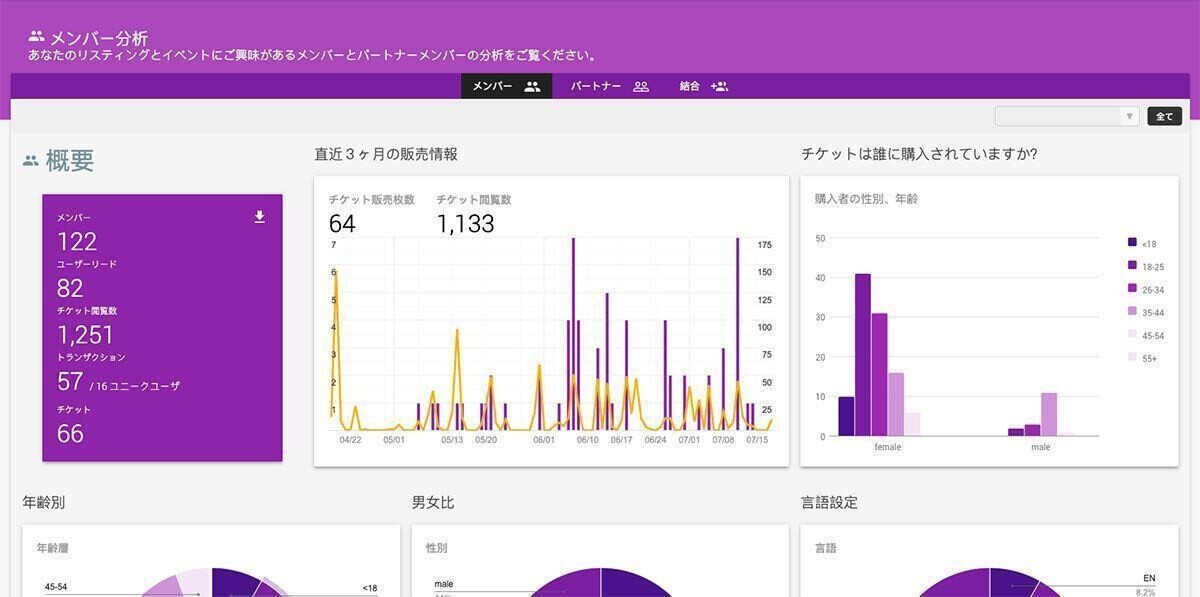
Members Connect member analytics screen
“Members Connect” is a tool that allows for attribute analysis of ticket purchasers, creating groups based on participation history and answers to questions, and sending emails to ticket purchasers.
Additionally, you can expect participant attraction by posting the automatically generated ticket link on social media.
With Zaiko's live streaming, you can use the Twitter-linked chat function if it is set up in advance. When a hashtag is set, any comments posted are automatically reflected on Twitter with the configured hashtag attached. If discussions about the event are active on social media, it is easier to connect this to next-time participant attraction.
While actively utilizing such convenient services to reduce tedious tasks, allocating more time to other matters is also important.
Things to Watch Out for on the Day of the Online Event
On the day of the online event, everyone must work together to ensure the success of the planning. However, unexpected troubles may arise on the day itself.
Including countermeasures, let’s summarize the key points to watch out for.
Progress According to Rehearsal and Script
Rehearsals for the online event should be conducted about 2 to 3 days before the event day. It is crucial not to cut corners during practice and to confirm everything as though it were the real event. If there are any mistakes or items that took more time than expected, make minor adjustments.
During the actual event, progress while utilizing the mistakes and reflections from the rehearsal. Since emotions can be heightened during the actual event, it’s easy to get carried away with improvisation, but when inexperienced, improvisation can lead to errors. Essentially, progress should follow the rehearsal plan.
Countermeasures for Troubles During Streaming
During the live streaming of the online event, troubles may arise. In such cases, consider the following countermeasures:
Temporarily stop the live stream
Stream pre-recorded footage prepared in advance
In such emergencies, responding with the manual prepared in advance is crucial. Maintaining composure while flexibly devising a solution is important.
Advance preparation is key to trouble response
To address troubles that suddenly arise during the event, you must anticipate possible situations in advance. Unless you have substantial experience, it is difficult to manage without any preparation.
After deciding on the online event's theme and target, research past incidents thoroughly. Most troubles have often been experienced by other event organizers already.
Sharing these incidents in advance with all staff can increase the chances of effectively addressing issues.
Create and share contact points and a response flowchart for trouble incidents
Simply gathering past incidents is insufficient for readiness against unforeseen events. To leverage this information effectively, create a flowchart for rapid response.
To communicate smoothly even in unforeseen situations, prepare intercoms (multiple broadcasting methods) in advance. These allow multiple people to communicate without operating buttons, making them very convenient for emergency discussions.
Fil also creating a flowchart that is as simple as possible is advisable for emergencies. Be sure to understand the outlined contents beforehand so that it can be utilized during incidents.
The images below center on the “video becomes distorted” situation as an example.
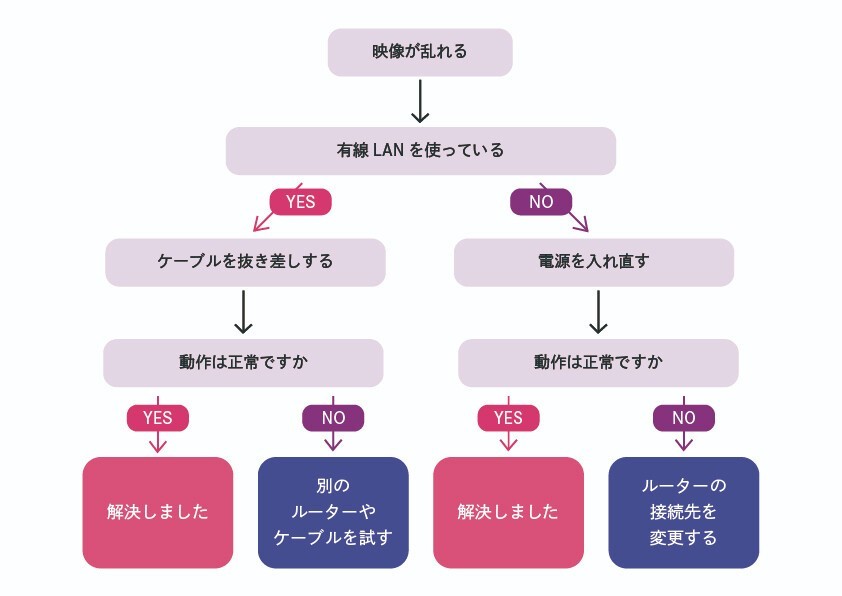
Examples of Troubles
Common troubles seen in online events include the following three points:
Video stutters and freezes
Shared screens do not display properly
Sound is inaudible or has interference
One potential cause for display issues is poor communication environment. Try to use wired connections as much as possible to create a state where the internet operates smoothly. Checking connection speed in advance can also alleviate concerns.
Moreover, issues with the microphone often result in sound interference. While checking the conditions is necessary from the rehearsal stage, be sure to have a backup available for unexpected disruptions.
It is sensible to regularly check the equipment well before rehearsals.
Checklist for Online Event Management!
From the planning of online events to responses during the actual event, it’s essential to pay attention to many points. To ensure the successful execution of the plan, it’s beneficial to outline considerations for hosting online events.
The contents discussed thus far are summarized in the table below. Be sure to make use of this.
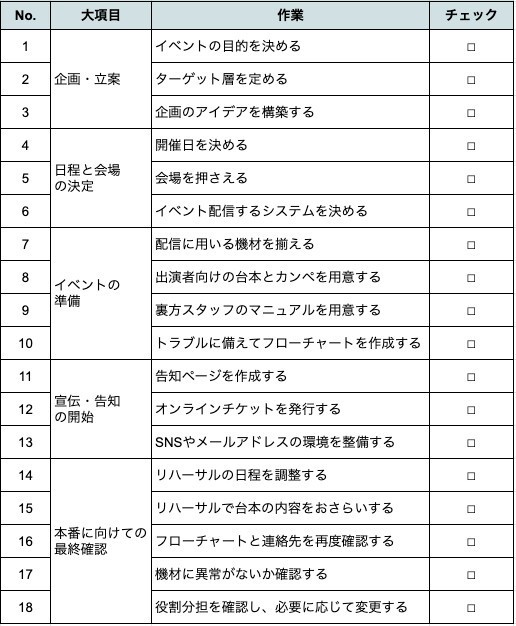
Checklist for Online Event Management
Properly Plan and Ensure the Success of Your Online Event
This article explains the significance of carefully planning for hosting an online event. To manage it skillfully, one must thoroughly engage from the basics, including defining the purpose and target audience.
Moreover, the success of the online event greatly relies on practice. Strict adherence to checklists, flowcharts, and rehearsals is imperative.
Zaiko supports the streaming, preparation, and promotion of online events. Let’s proceed meticulously with your planning to lead to a successful event.
More articles

ZAIKO and AppBank Inc. Begin Collaboration to Maximize Event Value by Leveraging Corporate Networks
ZAIKO and AppBank Inc. Begin Collaboration to Maximize Event Value by Leveraging Corporate Networks
ニュース
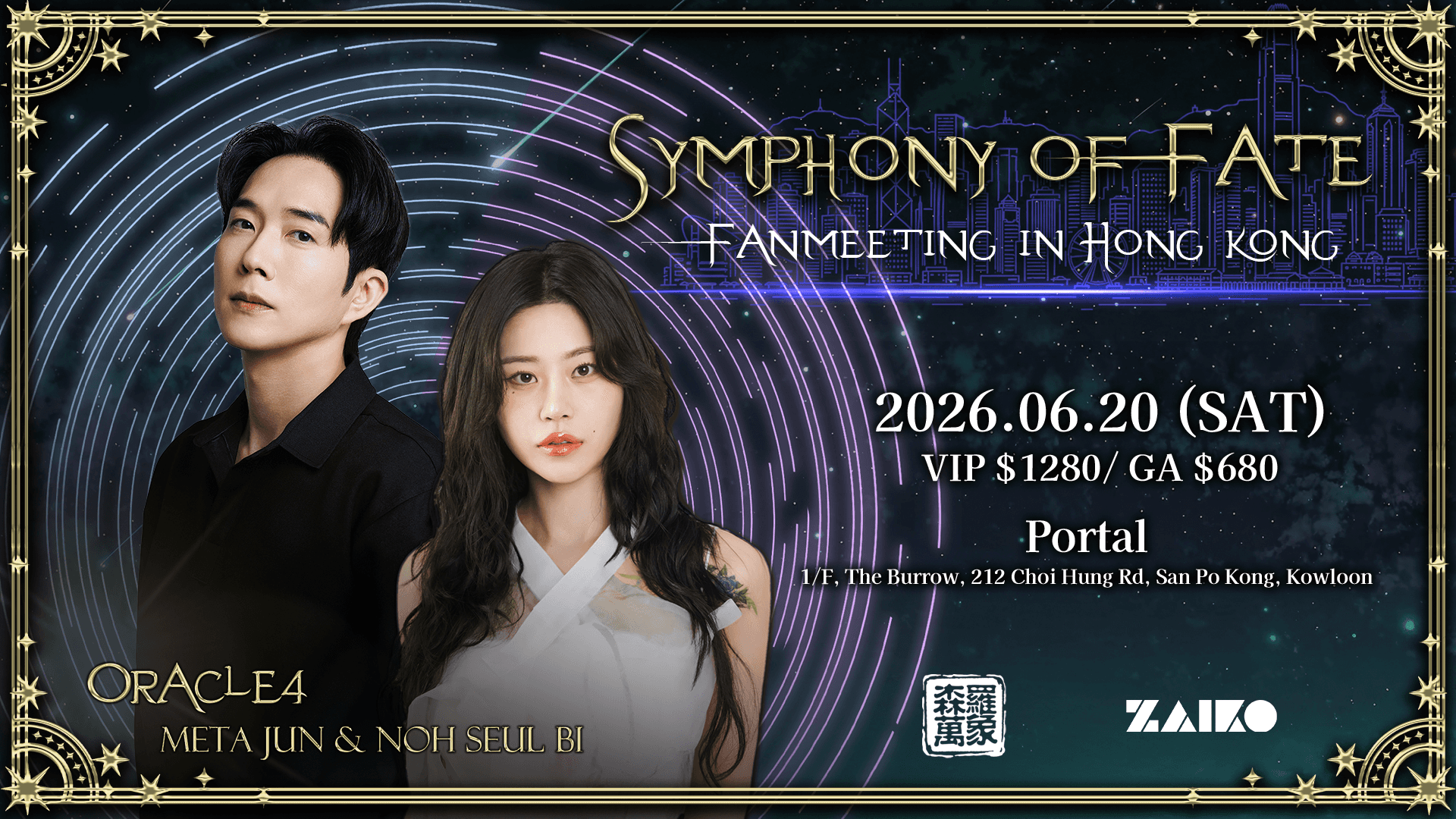
Fan Meeting & Fortune-Telling Sessions with Korea's Most Popular Fortune Tellers Noh Seul Bi and Meta Jun — Stars of the Hit Reality Show "Battle of Fates" — Coming to Hong Kong for the First Time!
Fan Meeting & Fortune-Telling Sessions with Korea's Most Popular Fortune Tellers Noh Seul Bi and Meta Jun — Stars of the Hit Reality Show "Battle of Fates" — Coming to Hong Kong for the First Time!
ニュース
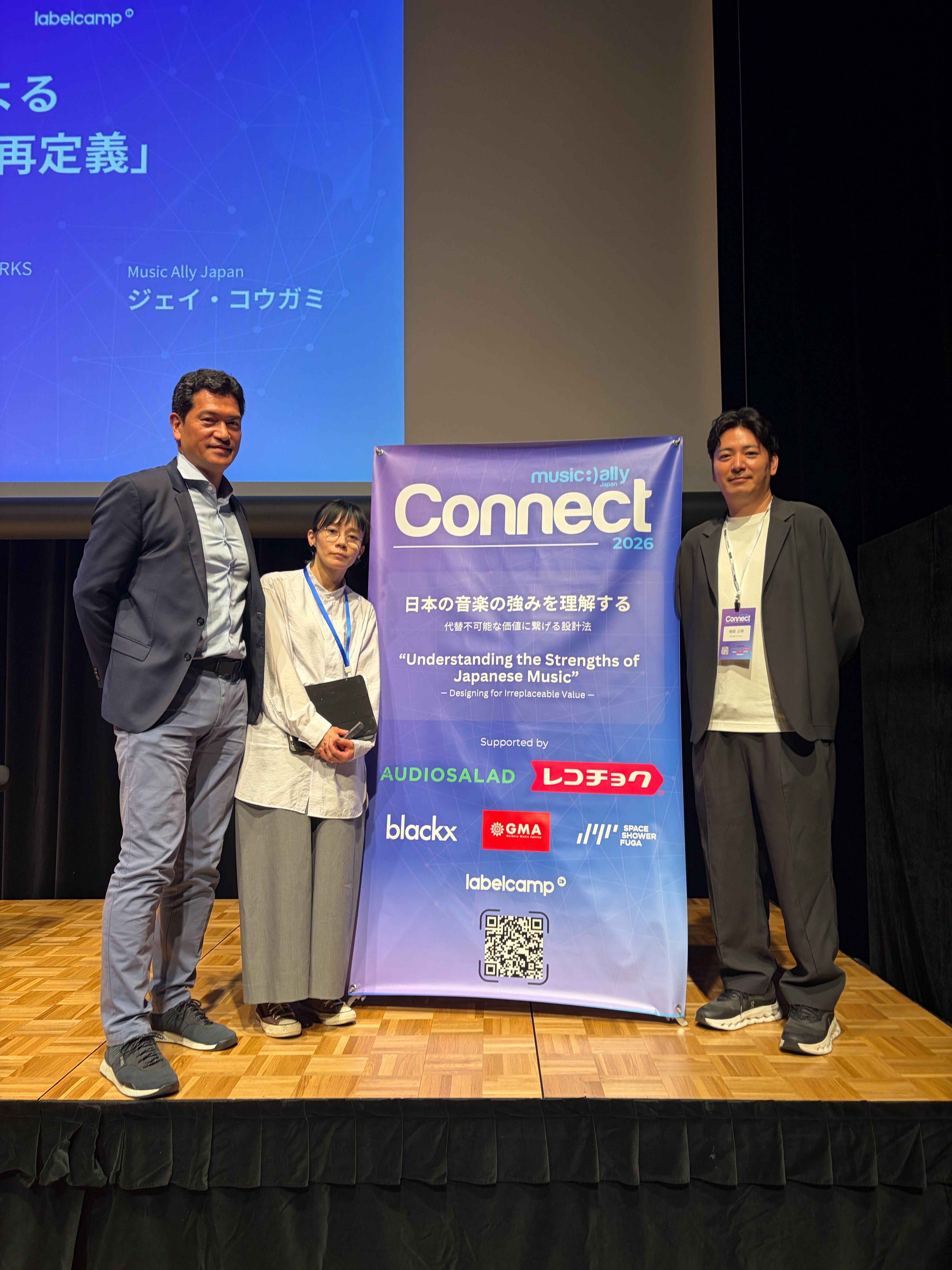
Our Representative Director, Shimada, spoke at Music Ally Japan Connect 2026. 🎤
Our Representative Director, Shimada, spoke at Music Ally Japan Connect 2026. 🎤
ニュース